
Continuous Integration with Github Actions workflow
Every project is different and so are its priorities, but they all have one thing in common: they need to be tested and deployed. You can do that by hand, but it gets repetitive and tedious fast — which is exactly what continuous integration and continuous deployment exist to remove.
Here I use GitHub Actions to automate deploying this project to Vercel, plus the checks that run before it: testing, linting, type-checking and documentation generation.
Design
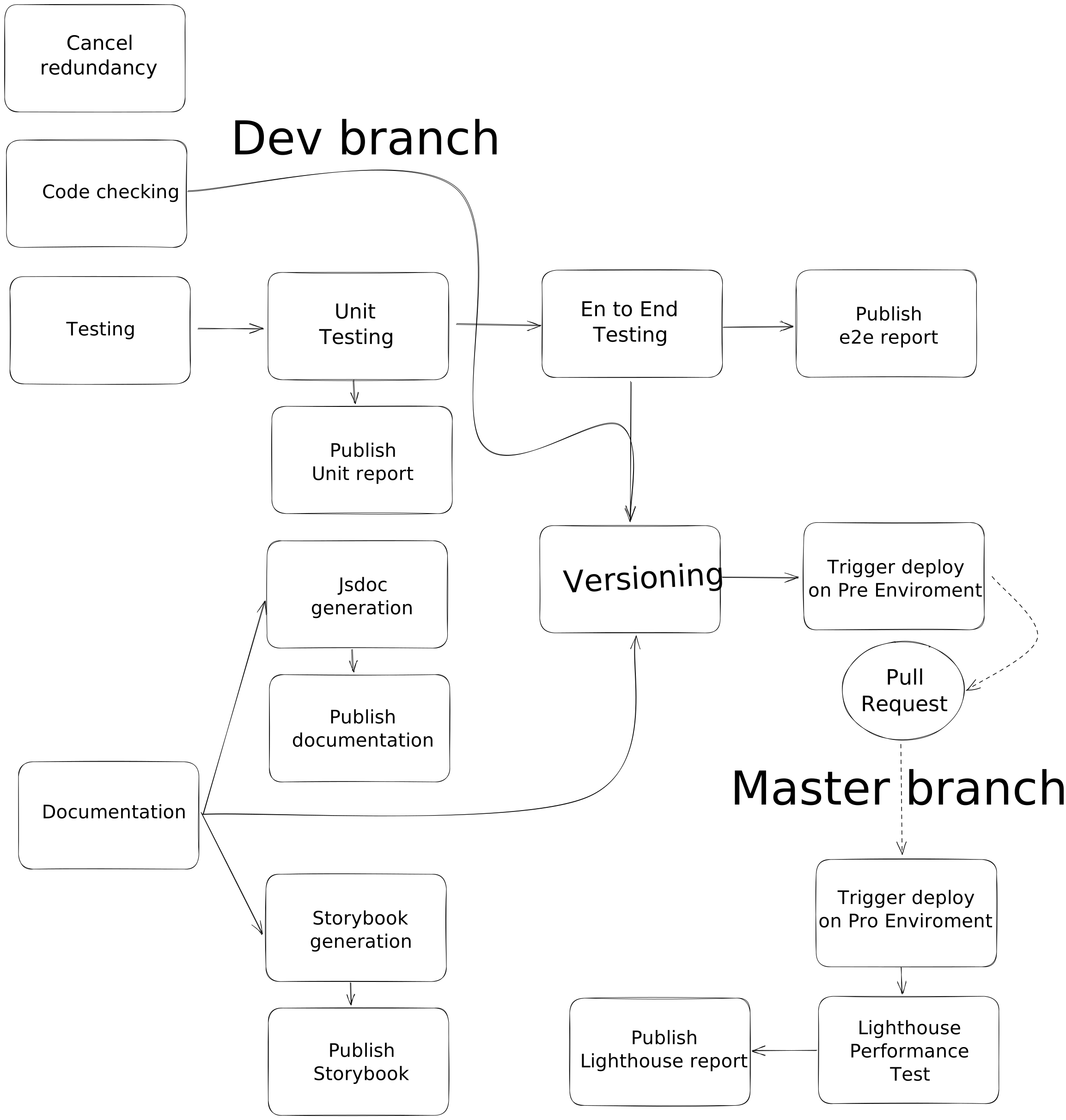
The part that takes the most thought is the pipeline itself — which tasks run, and in what order. I sketched the flow in Excalidraw and iterated until one shape stuck. Then it is mechanical: create a .github/workflows/ folder and drop your .yml files in it. I keep two, pre-deploy.yml and post-deploy.yml, and instead of explaining YAML syntax I will explain what each job does.
pre-deploy runs four jobs in parallel — cancel-redundant-runs, linting, testing and docs — and only if they all pass does it version and deploy to pre-production. I then test the feature or bugfix manually against that preview. If it holds up, deploying to production is just a pull request from dev to master. But the pipeline does not end at the merge: once it is live, post-deploy runs a Lighthouse pass and publishes a page-by-page performance report. Splitting it this way keeps the fast gates blocking (nothing ships broken) and the slow, live-site checks out of the critical path.
Here it is graphically:
This is a snippet of what the pre-deploy workflow looks like (Node 22, npm — update the versions to match your project, this is the kind of thing that goes stale):
Full workflow in my github
Five things worth doing from day one
- Cache the install.
actions/setup-nodewithcache: npmrestoresnode_modules-worth of downloads between runs and cuts minutes off every job. Point it at your real lockfile. - Cancel redundant runs with
concurrency:, not an action. Pushing three times in a row should not run three full pipelines. This used to be astyfle/cancel-workflow-actionstep here, and I removed it from my own pipeline for two reasons. It was pinned by a mutable tag, which GitHub's hardening guide tells you not to do for third-party actions — a tag can be repointed at new code, which is exactly how thetj-actions/changed-filescompromise reached thousands of repositories in March 2025. And it neededaccess_token, so I was handing a PAT with write access to five other repositories to a third party on every push. The nativeconcurrency:key does the same job with no token and no third-party code. - Set
permissions:explicitly. Without it theGITHUB_TOKENgets the repository default, which is broader than a linting job needs.contents: readat the top of the file, raised per job where something genuinely has to write, is the whole change. - Keep the action majors current.
actions/checkout@v4andsetup-node@v4still run, but they declare the Node 20 action runtime, which GitHub has been retiring from the runners.@v7is the current major for both and runs on Node 24. - Keep secrets in secrets. The registry token comes from
${{ secrets.NPM_TOKEN }}, never from the file. If a token ever lands in a committed.npmrc, rotate it — the runner reads it from the environment, not the repo.
Results
Each report has its own repository on GitHub, and that is where the output of every run is published:
Conclusions
Every time I add a component in React or a page in Next.js, a battery of tests checks that I have not broken the work already there — which only works because you are the one who has to write the tests for the delicate, critical parts. The pipeline does not invent coverage; it enforces the coverage you decided to have.
You can find all this code in my github repository, and if you liked it you can help me with a ⭐️. Thanks!