
How to fix Minified React error #425 (hydration mismatch)
Quick answer
React error #425 — "Text content does not match server-rendered HTML" — is a hydration mismatch: the server rendered one value and the browser rendered a different one, so React throws away the server markup for that subtree. The fix depends on why they differ:
- The value legitimately differs (a date, a time) → add
suppressHydrationWarning(Fix 1). - The value only exists in the browser (
window,localStorage) → render it after mount (Fix 2). - The whole component is client-only → load it with
next/dynamicandssr: false(Fix 3). - Your HTML is invalid (a
<div>inside a<p>) → fix the nesting (Fix 4).
The full production error reads: Uncaught Error: Minified React error visit https://reactjs.org/docs/error-decoder.html?invariant=425 for the full message or use the non-minified dev environment for full errors and additional helpful warnings.
What "Minified React error #425" actually means
In a production build React ships minified error messages to keep the bundle small, so instead of a sentence you get a number and a decoder link (invariant=425). #425 decodes to "Text content does not match server-rendered HTML".
That only happens with server-side rendering (Next.js, Remix, renderToString): React renders the HTML once on the server, sends it to the browser, and then hydrates — it reuses that HTML and only attaches the event handlers, expecting the client's first render to produce exactly the same output. When a piece of text comes out different, hydration for that subtree fails and you get #425.
Because the message is minified, the single most useful debugging step is to reproduce it in a development build — there React prints the full message and points at the exact element, which turns guesswork into a one-line fix (see "How to see the real error message" below).
Why hydration mismatches happen
Every #425 comes down to server output ≠ first client output. The usual culprits:
| Cause | Why it differs |
| --------------------------------------- | -------------------------------------------------------------- |
| new Date() / toLocaleString | Server clock/timezone ≠ browser clock/timezone |
| Math.random(), Date.now(), uuid() | A new value on each render, server and client never agree |
| Locale / number / currency formatting | Server locale ≠ the user's browser locale |
| window, localStorage, navigator | Undefined on the server, present in the browser |
| Invalid HTML nesting | The browser "fixes" your HTML, so the DOM ≠ what React rendered |
| Browser extensions | They mutate the DOM before React hydrates |
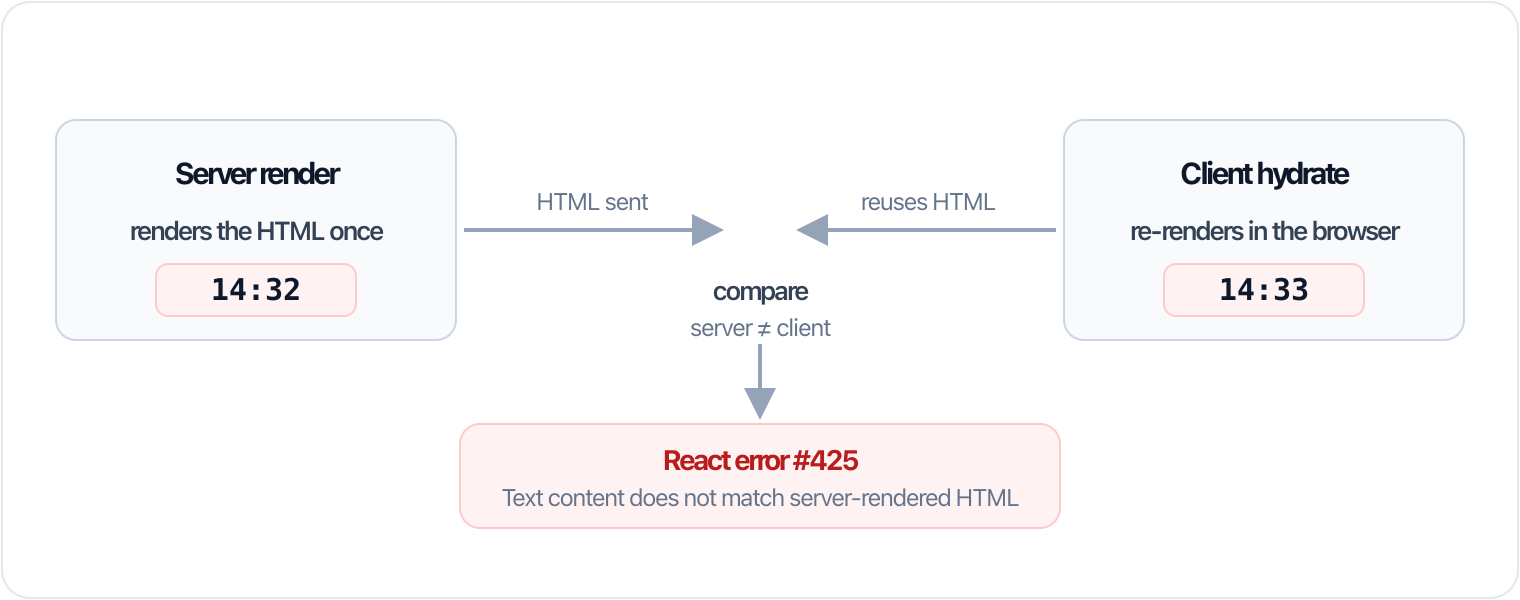
The example below is the classic case: a live clock.
The code that caused the error
The server renders the time for its clock and timezone; a second later the browser renders its own — the text differs and React raises #425.
Fix 1 — suppressHydrationWarning for legitimate text differences
When the difference is real and expected (a clock, a relative "2 minutes ago"), tell React to accept it on that element with suppressHydrationWarning. It only silences a text difference one level deep — it is a scalpel, not a blanket, so don't sprinkle it everywhere.
Fix 2 — Render browser-only values after mount
If the value simply does not exist on the server (window, localStorage, matchMedia), render a stable placeholder first and swap in the real value after the component mounts. The server and the first client render now agree, and the browser value appears on the next paint.
Fix 3 — Load client-only components with next/dynamic
When a whole component can never render on the server (a chart that reads window, a map, an editor), skip SSR for it entirely instead of guarding every line:
Fix 4 — Fix invalid HTML nesting
This one surprises people because there is no date or random value in sight. If you nest a block element inside a <p> (or an <a> inside an <a>, or a <div> inside a <table> without a <tbody>), the browser silently repairs the HTML on parse. React then hydrates against a DOM that no longer matches what it rendered — and you get #425. There is no attribute to suppress this: make the HTML valid (a <p> may only contain inline content).
How to see the real error message
Never debug #425 from the minified number. Reproduce it where React talks to you:
- Next.js: run
next dev— development is never minified. - Production build locally:
next build && next start, but read the message in the browser console where React prints the full text and a diff of the mismatched element.
React logs something like "Warning: Text content did not match. Server: '14:32' Client: '14:33'", pointing at the exact node. From there the cause is usually obvious.
#418, #422, #423, #425 — the hydration error family
If your searches turned up neighbouring numbers, they are the same problem seen from different angles:
| Error | Meaning | | ----- | ------------------------------------------------ | | #418 | Hydration failed because the initial UI differed | | #422 | Hydration completed but contained mismatches | | #423 | Error while hydrating; the tree fell back to CSR | | #425 | Text content does not match server-rendered HTML |
The fix is always the same discipline: run a dev build, find the value that differs between server and client, and reconcile it with one of the four fixes above.
You can read more about the attribute in the React documentation.